
Track your weight with your healthy range in view
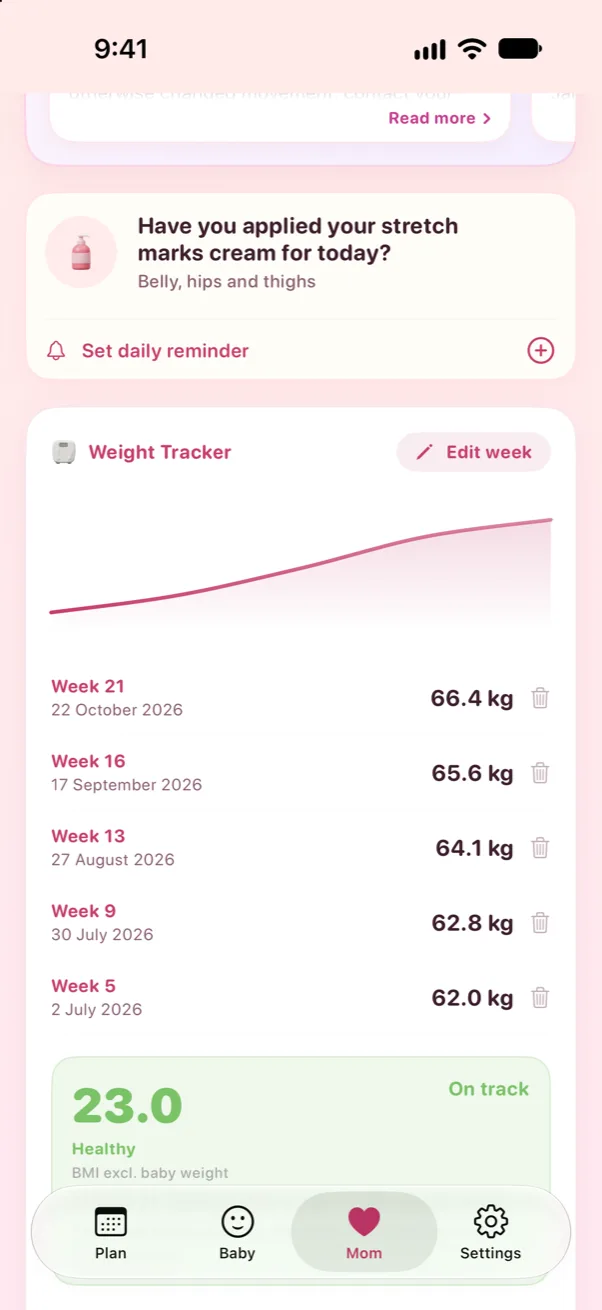
Tracking your weight helps you and your provider spot changes early. Prego shows your entries against the range that's right for your pre-pregnancy BMI.

How it works
- 1
Set your starting point
Enter your height and pre-pregnancy weight once, in kg or lb.
- 2
Log once a week
Add your weight each week. A gentle reminder helps you keep it up.
- 3
See where you are
Each entry shows against your recommended range, with an explanation of why weight changes happen.
- kg or lb, switch any time
- Recommended range based on your BMI
- Ranges for one baby or twins
- Weekly reminder
What parents say
“So cute and girly looking… simple, but also thorough, factual and helpful.”
“The best pregnancy app I've come across.”
Questions, answered
How much weight should I gain in pregnancy?
It depends on your pre-pregnancy BMI: 25 to 35 lb (11.5 to 16 kg) is typical with a healthy BMI. Try our free weight gain calculator.
How often should I weigh myself?
Once a week, at the same time of day, is plenty. Daily changes are mostly water.
What if I gain weight suddenly?
Sudden gain, especially with swelling of your face or hands, a headache or vision changes, can be a sign of preeclampsia. Call your provider straight away.

Get Prego for iPhone
Pregnancy Weight Tracker, your baby's size by fruit, a checklist for every trimester and more, private on your iPhone.